
Edit your MP3s to the perfect length
There are occasions when you may need to edit an MP3 track to make it shorter so it fits on your portable device, remove annoying commercials or join a few together.
MP3 Trimmer aims to help you do all of these and more via a fairly simple but powerful interface that doesn't take long to learn. The first thing to note is that when you open MP3 Trimmer, you're subjected to a 15 second wait while the program prompts you to register. Hiding the window doesn't help either so you've just got to put-up with it.
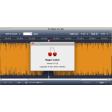
Once open, the interface requires you to load an MP3 track. If the audio track had a varying bitrate, MP3 Trimmer will warn you although it offers no help in equalizing it. On the left panel you can mark the in-point and on the right, the out-point. You can preview the 5 seconds preceding each point with the "Try" button to fine tune your editing. There are a few other boxes which you can check to edit your track such as adding an auto-fade and keeping the ID3 tag. There are also a few preferences which allow you to configure how your files are named and whether to check for the bitrate .
MP3 Trimmer is a very accomplished and professional feeling app which will cater to just about any basic MP3 editing need.
Unfortunately, the 2.9.4 release suffered from two minor errors, none of them critical. First of all, the built-in User Guide was not enclosed in the download package. Although in big need of an update, I suppose it is better than none at all! Sorry for that. This release contains the built-in User Guide as it should. Secondly, the version number on the application was wrong. It showed up as 2.9.2 in the Finder info. However, inside the application it properly showed 2.9.4. Indeed a non-critical bug, but it's corrected now. Several kind users have contacted me about helping out with translational help on the new User Guide. The main help I'm need of is probably proof-reading, since I will do the first, rough translation during writing. I will provide more info right here as soon as work has begun...
Changes
Unfortunately, the 2.9.4 release suffered from two minor errors, none of them critical. First of all, the built-in User Guide was not enclosed in the download package. Although in big need of an update, I suppose it is better than none at all! Sorry for that. This release contains the built-in User Guide as it should. Secondly, the version number on the application was wrong. It showed up as 2.9.2 in the Finder info. However, inside the application it properly showed 2.9.4. Indeed a non-critical bug, but it's corrected now. Several kind users have contacted me about helping out with translational help on the new User Guide. The main help I'm need of is probably proof-reading, since I will do the first, rough translation during writing. I will provide more info right here as soon as work has begun...































User reviews about MP3 Trimmer
by Anonymous
Someone is NOT taking care of business..
I've been a registered user of this program for several years. Unfortunately, the developer will NOT respond to emails about problems. I've written to the developer about this twice without response (using the email address they post on their website). Now every time I try to insert an itunes file, I get an Error Message that says, "An Exception of class NilObjectException was not handled. The application must shut down." I wrote the developer and got... NO RESPONSE! I hate to complain, the program is very useful, but if another program came along to do the job better I would switch. Someone is NOT taking care of business.Steve Bedell
sbedell@themusicdept.net
More